

Open your CRM and search for a client you know has been with you a while. If three records come back — one with the phone number, one with the booking history, one with the email address they actually read — you have a duplicate contacts problem.
Most businesses treat this as a tidiness issue and schedule a clean-up. Six months later the duplicates are back. That is because the clean-up never touched the cause.
Duplicate contacts in a CRM are almost never a data-entry problem. They are a sequencing problem, and the fix is one step in the right place.
What duplicate contacts actually cost you
It is worth being specific about the damage, because “messy database” does not sound urgent enough to fix.
- Staff lose confidence in the system. Once someone has opened the wrong record twice, they start checking all of them every time. That is a few minutes per interaction, every interaction.
- Automations fire at the wrong record. A follow-up sequence attached to the duplicate will not see the booking on the original.
- Clients notice. Receiving a “we haven’t heard from you in a while” email a week after an appointment is the kind of thing people mention to friends.
- Your reporting lies. Contact counts, conversion rates and retention figures are all inflated by records that are the same person.
- Marketing spend leaks. If you sync contacts into an ad platform, you pay to reach the same person more than once.
Why most integrations create duplicates by design
A standard lead automation has two steps: a form is submitted, and the automation creates a contact.
That works perfectly the first time each person fills in the form. The second time, it creates another contact — because the form does not know it has met this person before, and neither does the automation. Nothing is broken. It is doing exactly what it was told.
This is why duplicates appear gradually and then feel sudden. Every returning client, every person who fills in a second form, every enquiry from someone already in the database adds one. A third of your records being duplicates is a perfectly normal outcome of a two-step automation running for a year.
The usual non-fixes
Three things get tried before the real fix, and none of them hold:
- Training staff to search first. Works while people remember. The duplicates arriving through automations are not created by staff anyway.
- A monthly merge routine. Treats the symptom. The rate of creation is unchanged, so you are now doing this forever.
- Turning on the CRM’s built-in duplicate detection. Helpful, but most platforms detect on exact email match only, and flag rather than prevent.
The fix: look up before you write
Add one step before every write, and branch on the result.
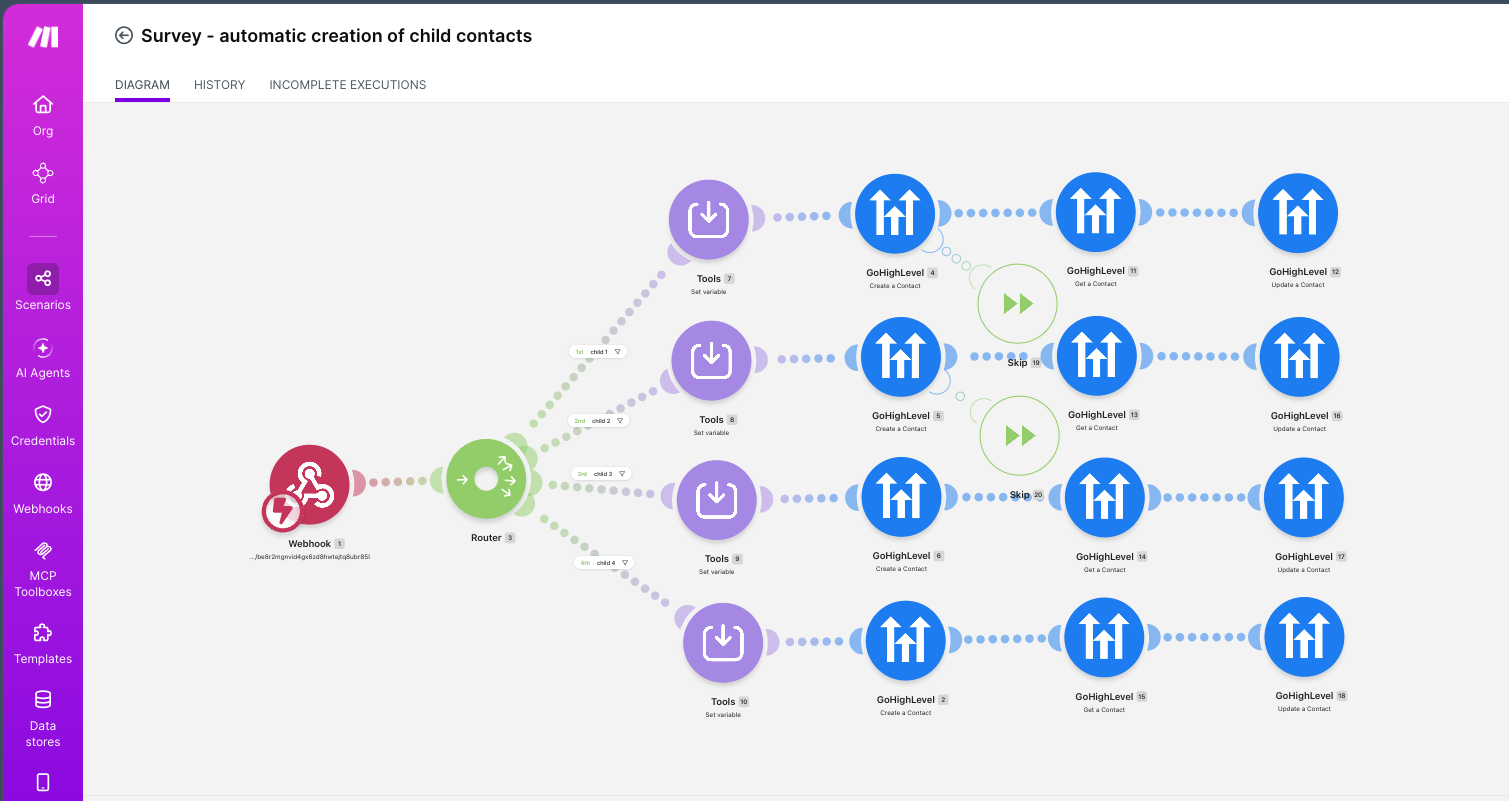
- Get Contact — search the CRM by your unique identifier
- Branch — found means update, not found means create
- Write — update the existing record, or create a genuinely new one
It is one extra API call per submission. It is also the difference between a database you can trust in a year and one you have to pay someone to deduplicate.
On a recent build, a single survey submission creates up to four linked contact records — a parent and up to three children. Every one of those writes is preceded by a lookup, with a skip node after the create step so the flow moves on cleanly when a match is found. More work to build; far less work to live with.
Choose your unique identifier before you build anything
This is the decision that matters most, and it is a business decision rather than a technical one.
| Identifier | Works well when | Breaks when |
|---|---|---|
| Most B2B, e-commerce, anything with individual accounts | Households or couples share an address | |
| Phone | Clinics, trades, bookings-led businesses | Someone changes number, or a landline is shared |
| Email + phone | You need high confidence | One matches and the other does not — you must decide what wins |
| External ID | You control the source system | Leads arrive from channels that cannot supply it |
Pick one, write down what happens in the edge cases, and build to it. Do not let the integration decide by accident.
Updating is not the same as overwriting
When a returning client’s record is found, be deliberate about which fields the automation may touch.
A new form submission should probably refresh their phone number. It should probably not blank out the notes a staff member typed last month because the form had no field for them — and many platforms will happily overwrite a populated field with an empty value if you let them.
A simple rule that holds up: the automation may fill empty fields and update fields the form explicitly asked about. Everything else it leaves alone.
Cleaning up the duplicates you already have
Fix the automation first. Cleaning the data before fixing the cause just means doing it again in three months.
Once the sequencing is right:
- Export and group by your chosen identifier so you can see the real scale.
- Decide which record wins when fields conflict — usually the one with the most recent genuine activity, not simply the newest created.
- Merge rather than delete, so history, notes and bookings are carried across.
- Take a backup first. Merges are hard to reverse.
- Re-check after a month to confirm the creation rate has actually stopped.
Frequently asked questions
Why does my CRM create duplicate contacts automatically?
Because most form-to-CRM automations are built to create a contact on every submission, with no lookup step first. The automation has no memory of previous submissions, so a returning client produces a second record.
Should I match on email or phone number?
It depends on your business. Email suits B2B and account-based businesses. Phone is usually more reliable for clinics, trades and bookings-led businesses where households share an email address. Whichever you choose, define in advance what happens when one field matches and the other does not.
Will my CRM’s built-in duplicate detection solve this?
Partly. Most platforms detect exact email matches and flag them for review rather than preventing creation. It is a useful safety net, not a substitute for a lookup step in the automation.
How many duplicates is normal?
Zero is achievable with a lookup-before-write pattern. If more than a few per cent of your records are duplicates, the cause is structural rather than human.
Is it worth fixing if the database is already messy?
Yes, and in that order — fix the automation, then clean the data. Cleaning first guarantees you will be cleaning again.
In short
Duplicate contacts are a sequencing problem. Most automations write first and check later; the fix is to check first and write once. One extra lookup per submission, a clear decision about your unique identifier, and explicit rules about which fields may be updated.
That is the difference between a client history that stays one history, and a database nobody trusts.
If you want to see what this looks like built out — including the lookup-and-skip pattern described above — have a look at the automation and systems work.